Magnet links do not open for you in Chrome!
Have you ever encountered a .torrent file and noticed that Chrome cannot open magnet links? This can be quite annoying, especially if you use these files fairly often.
Here are some instructions on how to download a magnet link file with uTorrent, as well as tips on how to resolve this issue for the future so that Chrome automatically sends the file to uTorrent for opening.
Ad Hoc Guidance 1) Find the magnet torrent file. 2) Right-click on the small magnet icon in Chrome, then copy the URL. 3) Launch the uTorrent/Torrent software of your choice. 4) Click on “Add torrent from URL” 5) Paste the magnet link into the field, press Enter. 6) Start the download.
6 steps, not bad if you just want to download a file or two. Too annoying for anything more than that. See below for a detailed guide on how to apply a fix.
This was done using the latest version (current) of Chrome (33.0.1750.117 m) and uTorrent (2.2.1) on Windows 7 Professional 64-bit, although newer versions of Chrome and uTorrent should still work!
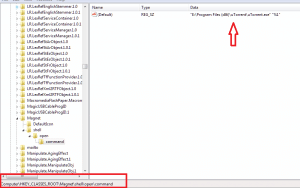
Permanent Fix GuideHKEY_CLASSES_ROOT Magnet shell open command on Windows 8 it’s 1) Press the Windows key (not literally) 2) Type “regedit” without quotes, then press Enter. 3) Navigate to HKEY_CLASSES_ROOT Software Classes Magnet This is what you will see (below)
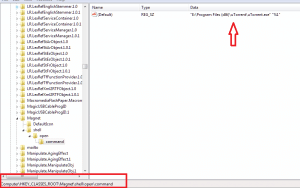
Where this arrow points — you will want to make sure that’s where your uTorrent is located. You may have a custom location, so be aware of that.
Completely close Chrome before moving on to the next step. (Otherwise, your modification 4) Then go to the following folder. C:Users AppDataLocalGoogleChromeUser Data 5) will not befalse saved) 6) Edit the “Local State” file using an editor of your choice (Notepad/Wordpad is fine) 7) Press Ctrl F and search for “magnet” — if you don’t have this entry, simply create it in the same place as shown in the screenshot below. It should be set to
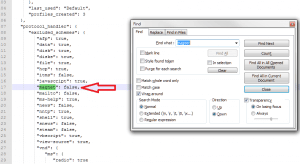
8) Save and close the file. All done!
As a side note, you may notice that when you click on a magnet link file, uTorrent may initially show the file as empty, but don’t worry… once you click OK/Next, the files will start downloading.
Tag : elite torrent alternative